
Black Arrow Cyber Advisory - 10 April 2026 - Microsoft device code phishing campaigns targeting Microsoft 365 users
Executive summary

Microsoft and other researchers are reporting a sharp rise in device code phishing aimed at Microsoft 365 users. Public reporting says detected device code phishing pages are up nearly 40 percent this year, while Microsoft says it has seen 10 to 15 campaigns every 24 hours with hundreds of compromises daily since mid-March. We have been involved in helping organisations respond to these types of attacks. Device code authentication is enabled by default in Microsoft 365.
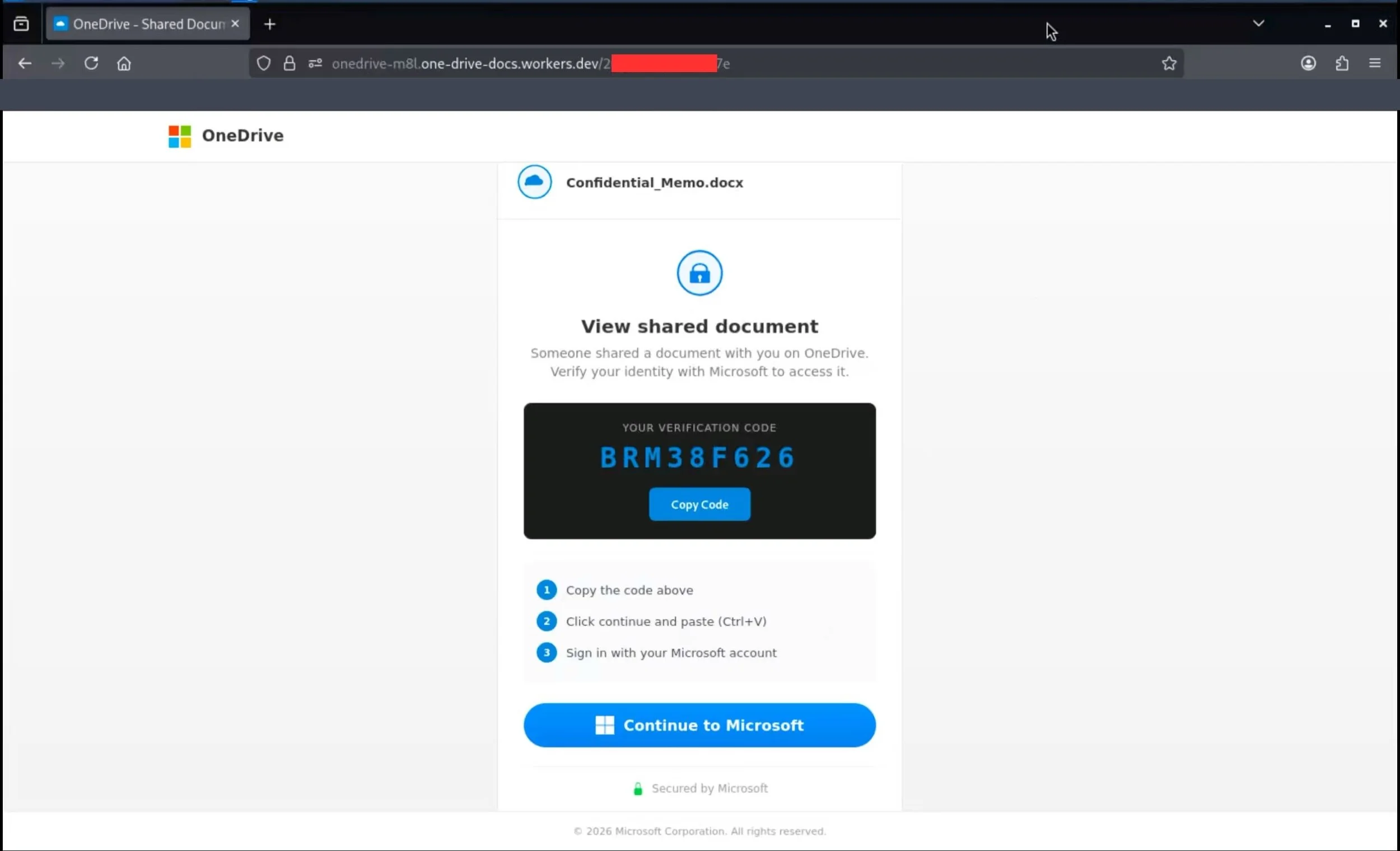
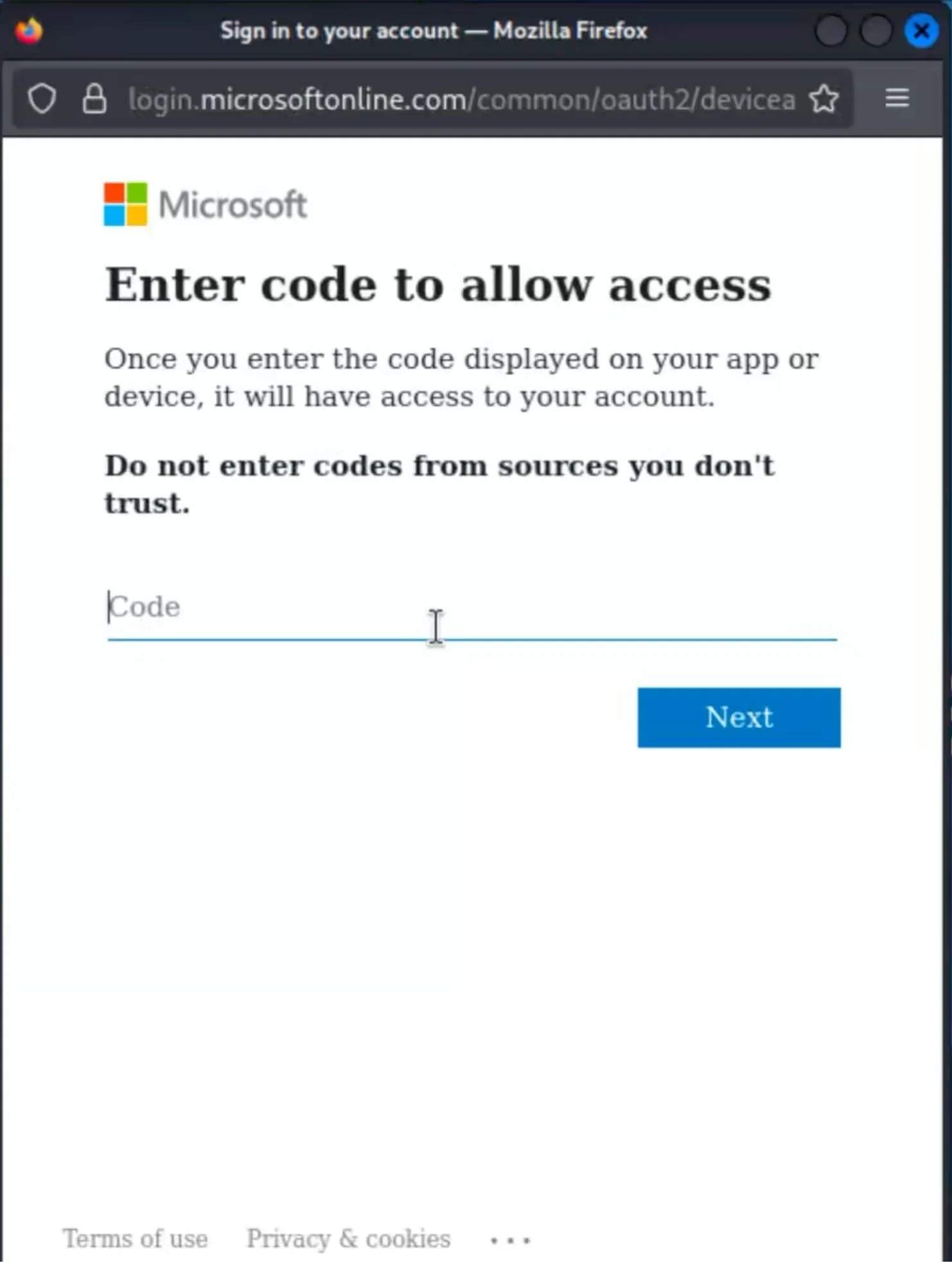
In these attacks, the victim is not usually sent to a fake Microsoft sign-in page designed to steal their password, as we have seen with other attacks of this type. Instead, they are tricked into entering a short code into Microsoft’s legitimate device login process, which authorises the attacker’s session. Once in, attackers have been seen reading mailboxes, creating malicious inbox rules, registering devices for persistence, and focusing on finance, executive, and administrative users.
For organisations that do not use device code authentication for a genuine business case, blocking the flow in Conditional Access is one of the clearest and most effective mitigations. Microsoft now explicitly recommends blocking device code flow wherever possible.
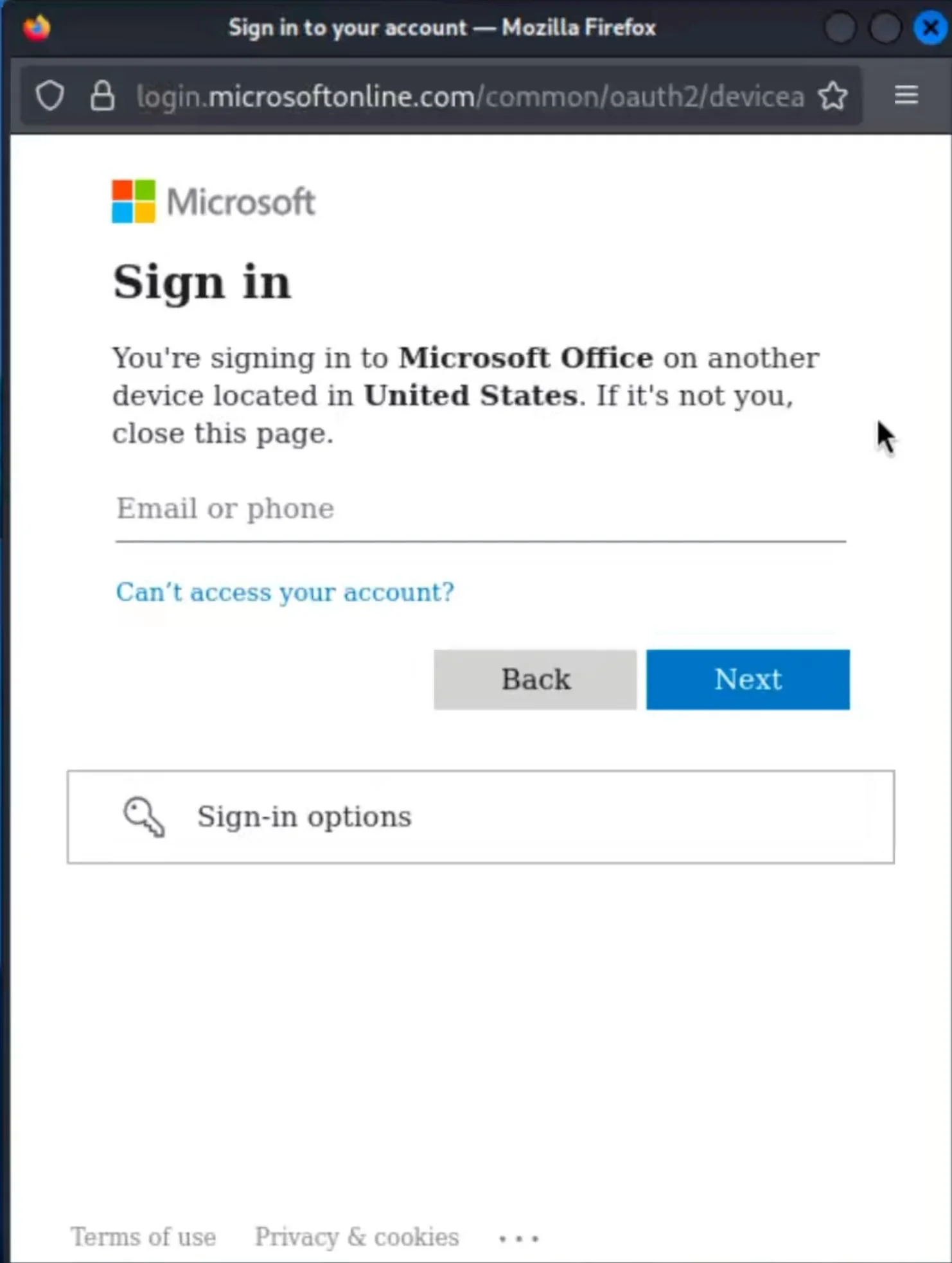
We have attached example screenshots from our own investigations showing what the landing page and follow-on Microsoft prompts may look like to an end user. It is important to note that, if a user is already signed in to Microsoft in their browser, they may not be asked to enter their credentials after submitting the code.
What is the risk to me or my business?
For most organisations, the immediate risk is an identity compromise inside Microsoft 365. A successful device code phish can give the attacker valid tokens, mailbox access, and a foothold for data theft, payment diversion, and ongoing surveillance of sensitive conversations. Attackers in the current campaigns have been observed creating inbox rules, using Microsoft Graph for reconnaissance, and targeting users with financial authority.
This is also easy for users to misread as genuine because the sign-in can happen through Microsoft’s real device login experience. That means ordinary “check the URL” advice is not enough on its own.
Technical Summary
Device code flow is a legitimate OAuth sign-in method designed for devices with limited input capability, such as smart TVs, printers, shared devices, and digital signage. In this abuse case, the attacker initiates the flow, sends the code to the victim in a lure, and relies on the victim completing the Microsoft sign-in on the attacker’s behalf. Once approved, the attacker can obtain tokens and access Microsoft 365 resources without needing the user’s password on a fake site.
What makes the current wave more effective is the level of automation and the visibility gap it creates for defenders. Microsoft says the campaigns are using AI-personalised lures, redirect chains on trusted cloud services, and dynamic code generation so the 15-minute validity window only starts when the victim reaches the final page. Detection is further complicated because the resulting activity can appear in Entra as non-interactive sign-in activity rather than a classic user-driven login, making it easier to blend into normal background authentication traffic and harder to spot quickly during routine sign-in review.
What types of organisations are most likely to be affected?
Any organisation using Microsoft 365 or Microsoft Entra ID is a potential target. Risk is highest where finance, payroll, procurement, executive support, or administrative users can be lured into approving access, and where device code flow remains enabled despite having no genuine operational requirement. Microsoft notes that device code flow is rarely used by most customers but is frequently used by attackers.
Organisations may also be more exposed where inbound email controls are weak against rare senders, new domains, or convincing external document-sharing lures. Microsoft has published detections for device code authentication occurring after a user clicks a link in an email from a non-prevalent sender.
What can I do?
1. Block device code flow where you do not need it
Create a Conditional Access policy for all users and all resources, set Authentication Flows to Device code flow, start in report-only mode, exclude emergency access accounts and documented exceptions, then move to block once you have confirmed there is no legitimate dependency. If you do need it for specific cases such as conference room devices or other shared devices, restrict it tightly rather than leaving it broadly available. Microsoft also offers a managed policy to help block device code flow.
2. Reset user expectations
Tell users never to enter a short Microsoft sign-in code unless they initiated the sign-in themselves from a known device or business process. Current lures include invoices, RFPs, shared documents, e-signature requests, and voicemail or secure message themes.
3. Tighten email controls
Review anti-phishing policies and Safe Links or equivalent controls. As an additional measure, where your email security tooling supports it, quarantine or heavily score inbound messages from newly registered or previously unseen domains, especially where they use external document-sharing, Adobe, Microsoft 365, DocuSign, or file-access themes.
4. Hunt for signs of compromise
Review Entra sign-in logs for device code authentication, unusual IP addresses, anonymous IP use, rare sender correlations, suspicious token use, and new device registrations. If you suspect compromise, revoke sign-in sessions, force reauthentication, review inbox rules, and check for unusual mailbox access or forwarding behaviour.
Further details and references
Microsoft Security Blog coverage and Microsoft mitigation guidance: https://www.microsoft.com/en-us/security/blog/2026/04/06/ai-enabled-device-code-phishing-campaign-april-2026/
Microsoft Learn guidance on Conditional Access authentication flow controls and blocking device code flow: https://learn.microsoft.com/en-us/entra/identity/conditional-access/policy-block-authentication-flows
Recent public reporting on campaign scale and adoption: https://www.theregister.com/2026/04/07/microsoft_device_code_phishing/
Need help understanding your gaps, or just want some advice? Get in touch with us.